Tag: Postcards

  • Christmas postcards (from Hawaii) with TouchNote

    Christmas postcards (from Hawaii) with TouchNote

    In Christmas of 2014, Michael and I had not long started renting our first flat together and as 22 year olds living in The Big Smoke (that’s London for you out-of-towners) we wanted to show off that we were a) grown ups and b) had a sense of humour. So upon seeing an advert for TouchNote and a bunch of viral homemade Christmas cards (you know that one with the man holding his cat but the cat’s head is also floating like a cat moon – google it) we decided to throw on our handmade Christmas jumpers and act out a scene from the 2003 film, Elf.

    Christmas 2014

    The year after we ended up moving back in with our parents and so the idea of photoshopping our heads (cat-moon inspired) into pre-existing images seemed more appealing than a photo on my parent’s sofa. This then became the recurring theme of our annual Christmas cards, sent all around the world, always with TouchNote.

    Christmas 2015 – Just to be clear, contrary to popular belief we weren’t claiming Michael was the Messiah! We were just lazily acting out the Nativity Scene!

    Why TouchNote?

    What I love most about TouchNote is how easy it is to use their app to make something so unique and personal which I can send all over the world, postage included. Not only does the app save you money, it also saves you time, time that could be spent exploring wherever you have travelled to, instead of hunting down post offices.

    Christmas 2018. We sent this one to Michael’s Nannies because they weren’t getting any of our references!

    Another great thing about having the TouchNote app is that it is my address book, no matter where I go. The app allows you to save addresses in the TouchNote Address Book, even when you’re not sending a postcard. So whenever I need to send something abroad, whether it’s a TouchNote card or not, I always go on the app to check my address book. Plus I recently learnt that you can add birthdays to the address profile and the app will send out a reminder to send that person a card – something that has proved very helpful when my travel schedule gets hectic and certain dates slip my mind.

    Christmas 2016 – We decided to revisit the theme of films from our first card, and thus our 2016 Blade of Glory (2007) card sparked the running theme for our future Christmas cards with TouchNote.

    Did you know that TouchNote prints and posts cards from the UK, USA, Netherlands and Australia? What does this mean? I’ll tell you. It means that the cost of international postage is minimal compared to sending something yourself from where you live. I am so grateful for this because every year I send out multiple Christmas cards to Australia, New Zealand and Canada so I know not only am I sending a personal and creative card with TouchNote, but I’m also saving money on postage. So sending Christmas cards out to all of your friends, old and new, that you’ve met on your travels around the world won’t make a hole in your pocket this festive season!

    As the printing location depends on the destination of your card, the delivery times can vary, but here is an approximation of how long it should take:


    • UK 1-3 working days


    • USA 2-5 working days


    • Europe 3-5 working days


    • Australia 2-4 working days


    • Rest of the World 5-10 working days


    Also keep in mind that postal systems work differently around the world so the delivery time does also depend on that. My advice is to get them sent off as early as you can, to avoid the Christmas postal back up!

    Christmas 2017 – Our Gremlins (1984) card really spoke for our true characters.

    Plus sending out your Christmas cards with TouchNote is so efficient now that instead having to dedicate a whole weekend to writing out endless cards, you can send one card in bulk in minutes. This year I was able to send out my cards in less time than it took the Gilmore girls to say coffee in the re-run I was watching (oh yeah, THAT fast). Take a look at the GIF below for how!

    What’s even better about TouchNote is that it’s not just cards that you can make with them! You can create canvases, framed photos and photo books. Plus if you want to go that extra mile to make your little ones’ Christmas even more magical, you can even send them a card from Santa! How exciting is that? Open the TouchNote app to find out more.

    To read more about why I use TouchNote or to get more information on how to order your postcard, delivery and memberships, take a look at Postcards from the world with TouchNote. 

    Save the world!

    According to Phs, during Christmas the UK alone creates 30% more waste than usual and included in that is approximately 1 billion Christmas cards that are put in the bin and not even recycled! Of course not sending cards would probably put you on a lot of people’s naughty list, but there is a way that you can prevent your card from ending up in a landfill: make it personal. By making a personalised Christmas card with TouchNote you can pull at your loved one’s heartstrings preventing it from getting thrown away. Each year all of our Christmas cards that we sent to friends and family come out on display, my best friend in Australia even treats them like her decorations and displays them on her bookcase every year.

    Amy’s bookcase every Christmas in Australia.

    So by sending cards that are too beloved to throw away, you’re basically saving the planet!

    Friends & Family testimonials

    Of course I could go on and on about why I love using TouchNote and how it has made sending postcards easier, more cost-effective and personal, but I figured you might want to hear from my nearest and dearest, and how they feel about receiving our TouchNote cards.

    “Confession: Every time I receive a Christmas card I read it, appreciate it for a moment, and then immediately discard it. EXCEPT for Michael and Gaby’s Christmas cards!!! They are so clever, and make us laugh so hard that they go right on the fridge where they remain and entertain for the next 365 days. Plus, my one year old daughter likes to gaze at them in her spare time.” 

    Katie, friend in Canada

    “I love my collection of hilarious and quirky postcards from Gaby, every Christmas I am so excited to receive one of her epic postcards. You never know what brilliant Christmas scenario they will add their faces to, utterly hysterical! I love them so much that they’ve become a part of my Christmas decorations, every year I get them all out on display.”

    Amy, friend in Australia

    Christmas 2018 – The best part about our Home Alone (1990) Christmas card is that half of the people who received it didn’t realise that we were The Sticky Bandits! This one in particular was a special edit for my Jewish family members.

    “Can you say that you’ve ever looked forward to opening a greeting card more than the gift it’s attached to? No? Well you haven’t received a personalised card then! Not to say that Gaby is a bad present buyer (she’s amazing), but the number of times we’ve been left on the floor crying in laughter after receiving one of her cards is unprecedented. I never realised she was one of the villains in Home Alone… or Mary in the Nativity Scene!”

    Julian, cousin in New Zealand

    Our 2019 Christmas card!

    So what are you waiting for? Download the TouchNote app here and get started on a more personal and unique Christmas card for your loved ones today! Whether it’s Photoshopped, a selfie, themed or just your favourite snap from this year, TouchNote will help you say “Happy Holidays” better than any card you could buy!

    You can also start your free 14 day membership where you will get access to all of the stickers and borders including festive ones for the holidays! To learn more about using the stickers, check out Get creative with travel stickers and TouchNote.

    Aloha, Gabriella

    Pin this post


  • Postcards from the world with TouchNote

    Postcards from the world with TouchNote

    Who are TouchNote?

    You know that special feeling you get when you receive mail through the door that isn’t an electricity bill, a flyer for an elderly care home or a fast food menu that doesn’t even have a voucher attached?! No, I’m talking when it’s something just for you, from someone you care about, that you didn’t know was coming, you know? Well, TouchNote took that and combined it with the digital era to create an award-winning app that allows you to send personalised postcards, greetings card and more via your mobile, tablet or desktop to your loved ones all over the world. In an instant you can send a photo from your travels, of your kids or pets, any cherished moment in time, and have it arrive through the mailbox of your nearest and dearest a few days later. It’s what TouchNote like to call “keeping in TouchNote”.

    Why I use TouchNote

    I have been using TouchNote since 2014, way back when Michael and I had officially put both of our names down on a lease for our first place together and wanted to send personalised Christmas cards out to our family all around the world. Since then I’ve using TouchNote to send birthday messages, thank you notes, Christmas cards and travel postcards to and from all over the world. 

    To get the best idea of why I love using TouchNote and how much it means to me and my loved ones, watch the video below created in collaboration with TouchNote.

    What I love most about TouchNote is how easy it is to use their app to make something so unique and personal at such a low cost. I have been sending my best friends postcards for almost a decade now and though finding the most ridiculous cards I could get my hands on was fun, it was always a pain to then purchase a stamp and locate a postbox. Since using TouchNote I can do it all from my phone at one all-inclusive cost for printing and postage.

    I sent this card to my parents’ next door neighbours in 2016. They lived next to my childhood home for years and are dear friends of the family. Michael and I set off for our 16 week long round the world trip where we visited their daughter who is living and working out in Sydney, Australia. They gave us a bon voyage card along with Aussie Dollars to spend on our trip, so to say thank you, we put together a few photos of us out in Australia on the TouchNote app and sent them a postcard.

    It’s not only sending them abroad that is cost-effective though. I can send postcards to my parents in England from anywhere in the world and only have to pay English postage because it will be sent from Guernsey. So not only is it cheaper but I also know it won’t take weeks to arrive! You can read more about where they print and post plus delivery time under “Delivery” further down.

    On the same round the world trip I mentioned above, I was able to send my parents postcards from Malaysia, Singapore, Australia, New Zealand, Hawaii, Las Vegas, the Grand Canyon, Hollywood, Yosemite, San Francisco, Seattle, Vancouver, New York and Rio de Janeiro in just three TouchNote postcards using their grid layout, at a fraction of the cost that it would have had I sent them individually from each destination.

    Another brilliant bonus about having the TouchNote app is that it is my address book, no matter where I go. The app allows you to save addresses in the TouchNote Address Book, even when you’re not sending a postcard. So whenever I need to send something abroad, whether it’s a TouchNote card or not, I always go on the app to check my address book.

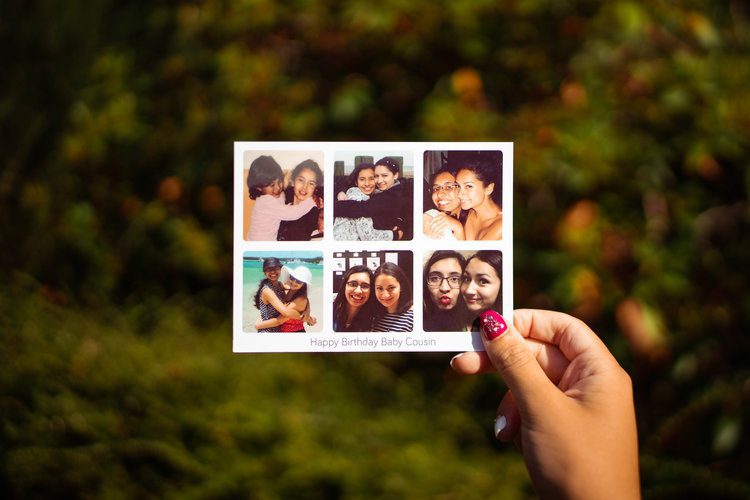
    Sometimes you just can’t find the perfect birthday card, so TouchNote comes in handy for sending one from the heart. The first card is a postcard I sent my (not so) baby cousin, Rachel, for her birthday and it’s a collection of photos of us together over the years. She lives in New Zealand and I’m in England so we don’t get to see each other often, so each photo is extra special.

    “I love receiving TouchNote postcards from my daughter from her travels around the world. TouchNote cards are more than just a postcard, it’s visually sending a little piece of her home. I see what she is seeing as well as her, it makes them so much more personal and keeping in touch is more enjoyable. The postcards all live on our fridge and are a constant and happy reminder for all to see.”

    My Mum

    Cost

    To pay for postcards, greetings cards and more you need credits. A postcard costs just one credit and a greetings card is two. The cost of credits vary depending on the country you are in and how many you are purchasing. There are three ways to purchase credits:

    Credit pack

    The best value for money for just purchasing credits is to buy a credit pack. For a long time this is what I would do around Christmas because I knew I would be sending multiple cards all at the same time. 

    Credit pack prices vary on your location but they all offer a discounted price for buying in bulk. For current pricing click here to view them via the app.

    Credits expire one year from the purchase date, so please remember to use your credits within a year.

    Per card

    If you only want to purchase one card you don’t have to purchase a credit pack, you can create your card and then simply pay for it at the end.

    Premium membership 

    There are four types of Premium memberships: Bronze, Silver, Gold and Platinum. Each one offers various perks that greatly benefit users who send postcards every month and love to get creative with TouchNote stickers, borders and more! The perks included are:


    • Free postcards every month


    • Money off extra cards


    • Money off other photo gifts


    • Access to 100+ Premium designs and illustrations


    • Use of photo filters


    • Use of stickers


    • Personalised stamps


    • Add the location to cards


    • Bonus free cards during the year


    What’s great about the premium subscriptions is that if you don’t use your cards for that month, they will roll over onto the next! So you can even be smart and bank a few every month ready for Christmas when you know you’ll have more to send out!

    You also have the option to pay monthly or one upfront cost. To securely pay for your credits, TouchNote accepts Visa, Mastercard, American Express and PayPal.

    Before committing, why not try out a Premium membership for free via TouchNote’s 14 day free trial offer!

    Delivery

    TouchNote prints and posts cards from the UK, USA, Netherlands and Australia. This means that the cost of international postage is cut down drastically. I am so grateful for this because I send out Christmas and birthday cards to Australia, New Zealand and Canada so I know not only am I sending a personal and creative card with TouchNote, but I’m also saving money on postage.

    As the printing location depends on the destination of your card, the delivery times can vary, but here is an approximation of how long it should take:


    • UK – 1-3 working days


    • USA – 2-5 working days


    • Europe – 3-5 working days


    • Australia – 2-4 working days


    • Rest of the World – 5-10 working days


    Also keep in mind that postal systems work differently around the world so the delivery time does also rely on that.

    .

    So what are you waiting for? Send your loved ones a personalised message through the good old fashioned post and make their day. Whether it’s for a birthday, good luck, congratulations or just a reminder of how much you care for them, TouchNote will help you say it better.

    Download the app here and don’t forget you can trial the Premium memberships for free for 14 days here!

    Aloha, Gabriella

    . 

    Disclaimer: This is a paid post in partnership with TouchNote UK. Please know that I have been using them since 2014 and I only recommend brands I personally love and use myself.